
LinkedIn is still one of the best places to build an audience from scratch, and you can increase your LinkedIn followers there organically, with no paid ads, no follower buying, and no growth hacks.
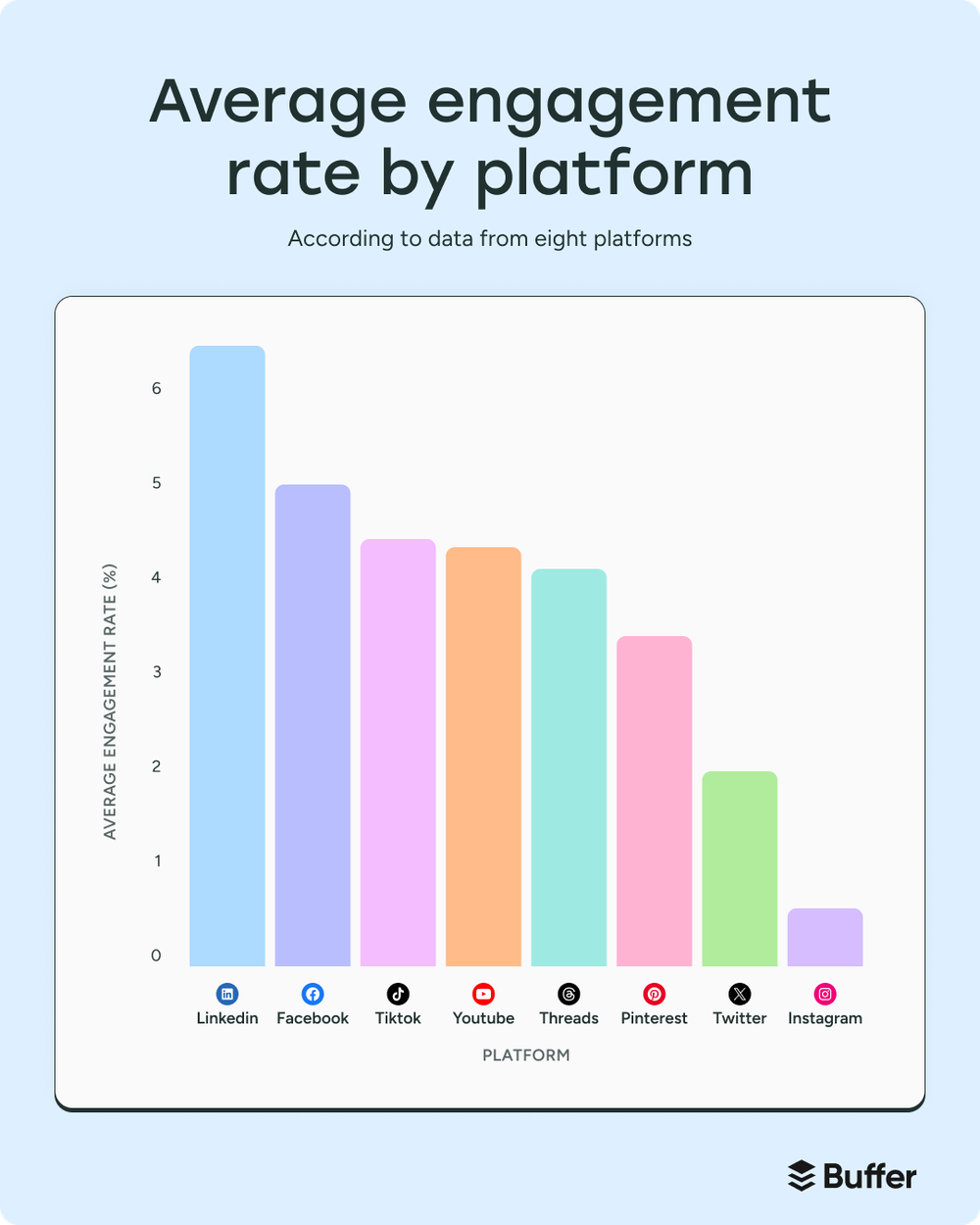
When I went through 52 million posts across 10 platforms for our State of Social Media Engagement report, LinkedIn had the highest median engagement rate of any platform we looked at, at around 6.2%.
LinkedIn has also become the most-cited website in AI search for professional questions, according to Profound's tracking, and more of what gets cited is what people post. So what you share on LinkedIn can show up when someone asks ChatGPT about your field.
It's worked for me, too. I made my account in 2017 but only started posting in 2020, when I was looking for community after losing my job. I now have over 25,000 followers, and posting has led to brand partnerships and invites onto podcasts and YouTube channels, which I never would've thought possible when I started.
You don't need millions of followers, and you don't need to be the world's foremost expert in your niche. A smaller following that cares about what you have to say will do far more for you than a huge one that doesn't.
So if you really, really want to grow on LinkedIn, whether as a creator, a founder, a business owner, or someone starting from zero, this guide is for you. It pairs what's worked for me with Buffer's data on millions of LinkedIn posts, and there's a section for company pages too.
Key takeaways
- Switch your profile's main button from Connect to Follow. Connections are capped at 30,000 and need a yes from both sides, while followers have no cap, and everyone who connects with you follows you anyway.
- Stick to three to five topics. LinkedIn's feed now matches posts to people based on what they're about, so a clear focus helps it find your audience.
- Try carousels. In Buffer's analysis of 52 million posts, LinkedIn carousels had a median engagement rate of 21.77%, about three times video and nearly seven times text-only posts.
- Don't worry about posting too often. In Buffer's study of 2 million+ LinkedIn posts, accounts posting 11 or more times a week averaged nearly 17,000 more impressions per post.
- Reply to your comments. About 83% of LinkedIn profiles in Buffer's data performed better when they replied, the highest share of any platform.
- Keep your posts sounding like you. LinkedIn added a "Seems like AI slop" report option in July 2026, and flagged posts are seeing about 40% fewer views.
- Grow a company page through your team. Personal LinkedIn profiles get 57% higher engagement than company pages, according to Buffer's analysis of 20 million LinkedIn posts.
Jump to a section:
- Optimize your LinkedIn profile
- Create LinkedIn content people follow you for
- Turn conversations into followers
- Use LinkedIn features to boost your growth
- How to grow LinkedIn company page followers
- Increase your LinkedIn followers, starting today
- FAQ on how to increase LinkedIn followers
- More LinkedIn resources
Optimize your LinkedIn profile to get more followers
Your LinkedIn profile is where most people decide whether to follow you. You can follow someone straight from the Follow button on their posts, but if most people are like me, they click through to the profile first to see who you are and what you post about. So the four changes below are about making that visit worth it, and together they should take about half an hour.
1. Switch your profile button from Connect to Follow
This is the first, easiest thing anyone can do to objectively “get more followers.”
By default, the big button on your LinkedIn profile says Connect. When you switch it to Follow, anyone can follow you in one tap instead of sending a request and waiting for you to accept it. Here's how followers and connections compare:
- Connections are capped at 30,000 and need a yes from both sides.
- Followers have no cap, and anyone can follow you without waiting on you.
And you won't lose anything by switching, since people can still send you a connection request from the More menu on your profile.
LinkedIn used to bundle this setting into Creator Mode, which it retired in March 2024, but the setting still exists on its own. To turn it on, go to Settings & Privacy → Visibility → Visibility of your LinkedIn activity → Followers, and turn on "Make follow primary."
2. Write a LinkedIn headline that says who you are and who you help
Your LinkedIn headline shows up next to your name everywhere: on your posts, in your comments, and in search results. Most people use it for their job title, but unless you work in a role like Chief Imagination Officer or you're the CEO of a Fortune 100 company, your title alone likely isn't enough reason for someone to follow you.
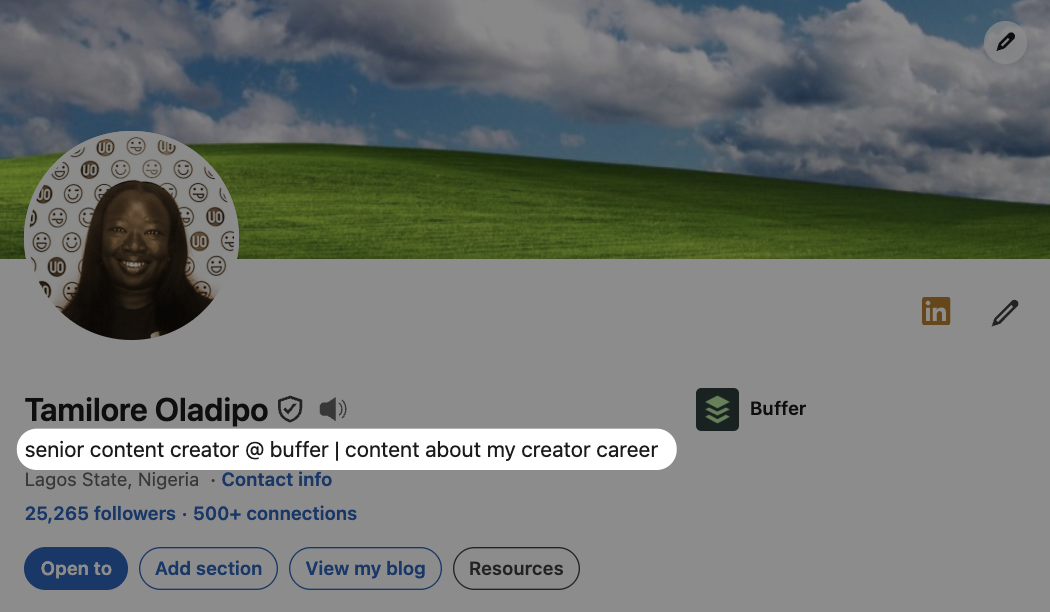
Mine is "senior content creator @ buffer | content about my creator career." That's the simplest formula: your role plus what you post about. The first half is about me, and the second half tells you what you'll get if you follow.
Here are a few other formulas I see on profiles I follow, and who they tend to work for:
- Your role + your credentials. Carmen Vicente leads with "Social Strategist in tech," then follows with LinkedIn Top Voice, 40k on TikTok, and B2B Social's Rising 30. Erifili Gounari does a longer version of the same thing.
- What you do for who + your credentials. Brandon Smithwrick's starts with "I teach content playbooks for marketers & creators" and then lists his newsletter, Forbes 30U30, and the companies he's worked for. You'll see "I help…" used the same way on a lot of consultant profiles.
- Your title + your brand. Sophie Miller's is just "creator + founder @prettylittlemarketer". At 242,000 followers, people already know the brand, so she doesn’t need to do much more explaining.
Whichever formula you use, put the most important part first. You get 220 characters, but only the first 60 to 70 show up in search results and comment sections. (Mine is 65 characters, so it just about fits.)
⚡ Pro tip: What would your ideal client or follower type into LinkedIn search? Those words should be in your headline. I wrote more about this in our guide to LinkedIn SEO.
3. Use your LinkedIn About section to get people invested in you
Your About section is the one place on your profile where you have real room to chat, with 2,600 characters to play with. I've seen many people use that space to paste what amounts to a CV, but anyone reading it has already seen your headline and job title, and your Experience section covers the rest.
What visitors don't know yet is who you (really) are. By the time someone reaches your About section, they've probably seen one of your posts and your headline, and they're deciding whether they want to keep seeing more. So this is the place to share some of your story, career-wise and content-wise, and give them a reason to care.
A few things worth including:
- How you got to where you are in your career/life, especially if it wasn't a straight line.
- What you make content about, and why it matters to you.
- What you'd like people to do next, whether that's follow you, subscribe to something, or get in touch.
And like your headline, put the important part first. Only about the first 300 characters show before "…see more," and plenty of people won't click it.
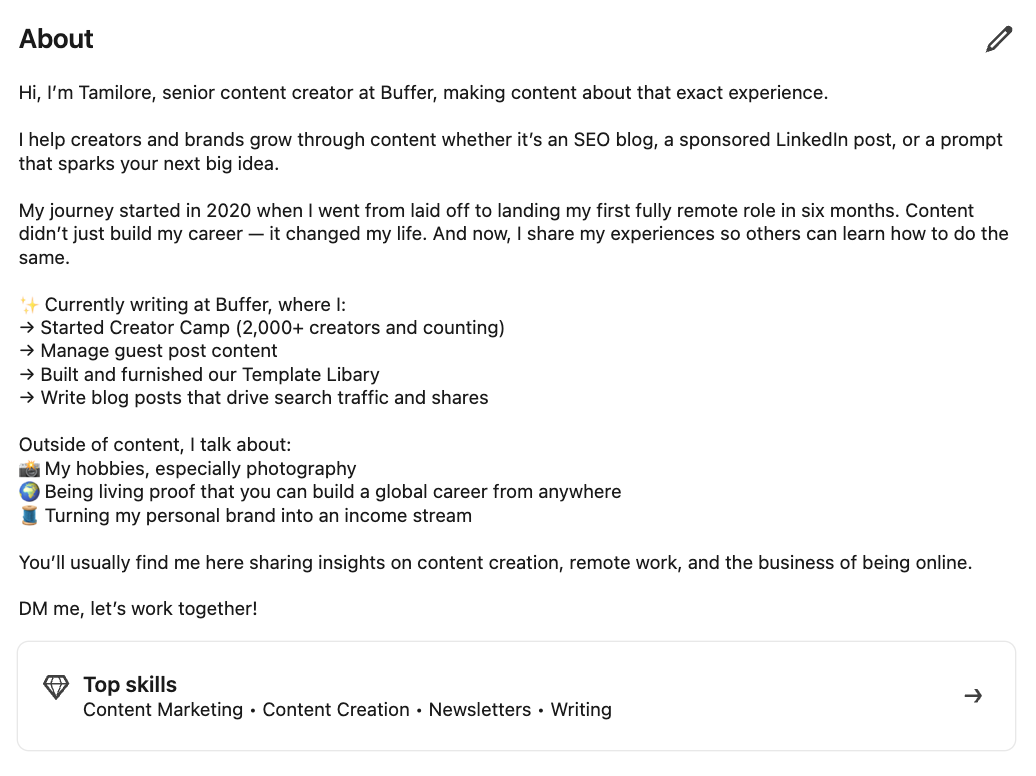
Here's how four people I follow handle theirs. Two are creators, one runs an agency, and one consults for brands, and they're all quite different:
- Carmen Vicente goes all in on who she is: two paragraphs about how she thinks and what she cares about, with no credentials and no call to action. Her headline already carries the Top Voice badge and follower counts, so her About can focus on personality.
- Brandon Smithwrick tells his story in short lines. He includes where he's worked, what he teaches now, his credentials in one "TLDR" paragraph, and then two arrows at the bottom, one to subscribe and one that says "Or just hit follow. I post playbooks here daily.”
- Annie-Mai Hodge uses arrows as bullets, split into a little about her ("an accidental b2b influencer") and a little about her agency and why she started it.
- Rachel Karten writes three plain paragraphs: who she is and her newsletter, who she's worked with and where, and "Want to work with me? Shoot an email over to…".
4. Put your best work in the Featured section
The Featured section sits just below your About section, so it's often the first place people see your actual content. You can pin posts, articles (including newsletter editions), links to things like your website, and media like PDFs or slides.
This is the one place on your profile where you decide what someone sees first, so choose what you'd most want them to see before they follow you. A few things worth putting in it:
- A post that explains what you do or who you help, so a new visitor gets the idea without scrolling through your activity.
- Your best-performing post, whatever the format. It's already shown that people like it.
- Your newsletter, lead magnet, or booking link, if you have one. It's the easiest place on your profile to turn a visitor into a subscriber or a client.
I tend to pin my latest brand partnership in my Featured section, so whoever clicks into my profile sees it first. I also keep resources I want to share with my audience in there.
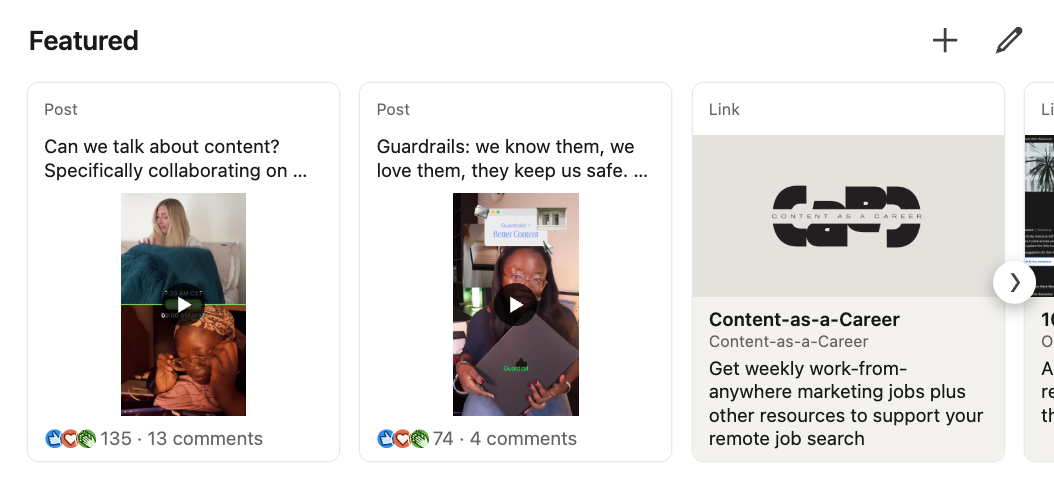
It's worth swapping these out every few months, or whenever you publish a post or get featured in something you want to highlight.
📚 For more ways to improve your profile, here are 30+ LinkedIn profile tips.
Create LinkedIn content people follow you for
Once your profile is sorted, your content is what actually gets people to hit Follow, because it's how most people will find you in the first place. LinkedIn only shows your posts to people it thinks will engage with them, the same way your own feed only shows you posts it thinks you'll stop for. So everything in this section comes back to two things: helping LinkedIn work out who your posts are for, and making those posts worth stopping for.
🎥 If you'd rather watch, my colleague Kirsti Lang walks through the LinkedIn playbook that got her to 12K followers and 6 million impressions.
5. Understand what the LinkedIn algorithm looks for
LinkedIn's feed tries to predict two things about every post: whether people will stay on it, and whether they'll react to it. In a paper LinkedIn's engineers published in early 2026 about how the feed ranks posts, they call the first one "long dwell" (staying on a post past a certain point). The second is whether someone likes, comments on, or shares it.
LinkedIn also announced a rebuilt feed in March 2026 that uses AI to understand what a post is about, and updates its picture of what each person is interested in within minutes. If you've ever liked a couple of posts on a topic and then seen nothing but that topic for a week, that's what's going on.
LinkedIn doesn't publish how it weights any of this, so no one can tell you the exact number of seconds someone needs to spend on your post. But in practice, it's fairly simple:
- If you post about the same few things consistently, LinkedIn can more easily work out who to show your posts to.
- If every post is about something completely different, that's harder.
- And once a post reaches the right people, it has to hold their attention and give them a reason to react.
📚 For more on how LinkedIn decides what to show, including what the LinkedIn team told us directly, read our full breakdown of how the LinkedIn algorithm works.
6. Niche down to 3 to 5 topics you could talk about for hours
If LinkedIn's feed is trying to work out who to show your posts to, the easiest thing you can do is make that obvious by picking a small number of topics and sticking with them.
Now, as someone who rages against the niche machine, I understand if you immediately want to scroll past this tip. But WAIT! Give me a second.
If you've already found the overlap between what you want to make content about and what people want to learn from you, you can skip this one. But if you're still getting to know your audience or figuring out what you want to create (or both), starting niche and then going broad might work better for you.
You can probably name three topics you could spend hours talking about, and you don't have to be an expert in any of them.
If you're job searching, that's a topic. If you're running a business, what you're figuring out along the way (pricing, hiring, landing your first big client) is a topic. Learning a new skill counts too, because you'll see it differently than someone with 10 years of experience.
Then think about who you want to reach and where they get stuck. Your topics sit where that overlaps with what you know. If you're stuck, picture a podcast you'd get invited on and ask yourself what the host would want you to talk about.
The narrower you can get, the better. "Marketing" is too broad. "B2B SaaS marketing for early-stage founders" is a niche people will see themselves in and follow you for.
If I had to pick three pillars, I'd say mine are content creation, remote work, and the business of being online. You can see all three reflected in my About section, and most of what I post lands in one of them. (I do wander off into photography and lifestyle content now and then, but the core three don't change too much.)
My colleague Hailley Griffis, who leads communications at Buffer, works the same way with three pillars of her own: her career and work at Buffer, the systems she uses in work and life, and brand marketing. She grew her LinkedIn audience by 26% in the first half of 2025 with them.
A focused following can also go further than a bigger one. As LinkedIn consultant Melanie Goodman put it this year, "An account with 8,000 focused followers can outperform one with 80,000 unfocused ones."
7. Write LinkedIn hooks that make people click "See more”
Your hook is the opening of your post, and its job is to get people to click "…see more" (and, ideally, hit Follow while they're at it). You don't get much room to do it, either. Only the first line or two shows in the feed before the cutoff, so whatever makes someone stop has to be right at the top.
In AuthoredUp's analysis of nearly 310,000 LinkedIn posts from December 2025 to May 2026, four kinds of opening lines did best. Here they are, in order:
- Start in the middle of a story. "I got fired on a Tuesday. By Friday I had three job offers."
- Say the opposite of what people expect. "The best time to post on LinkedIn isn't first thing in the morning."
- Make a bold claim, but only if you have the data to back it up. "Posting more on LinkedIn doesn't hurt your reach. We checked 2 million posts."
- Lead with a number or a result. "My impressions went up 122% in seven days. Here's what changed."
You'll notice questions aren't on that list. They're the most common hook advice out there, but they came last in AuthoredUp's study, with a median engagement rate of 2.16% against 2.60% for story openers. That matches what I've seen on my own posts, though I'd take any single study on this with a pinch of salt.
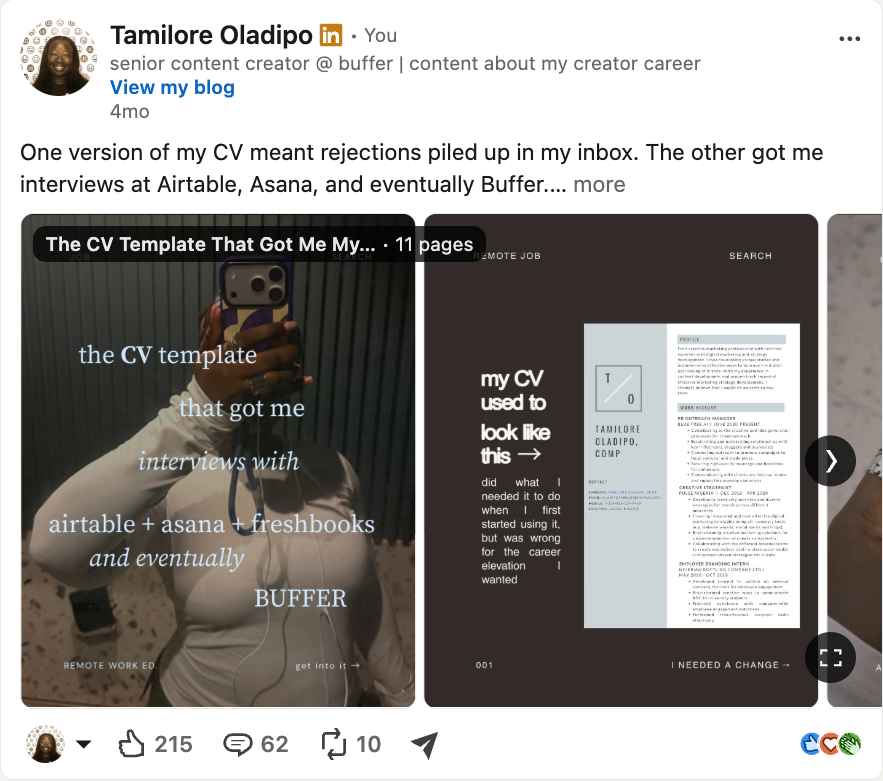
Use this test on your next post: if you saw only the first two lines from a stranger, would you click "…see more"?
📚 I've written more about the anatomy of a great hook if you want to go deeper.
8. Post like a person (and be careful with AI)
Once someone's clicked "…see more," the post has to give them a reason to stay and a reason to react. The simplest way I've found is to post the way I'd talk to a friend or colleague about whatever I have going on.
I said in the intro that you don't need to be the world's foremost expert, and this is where that matters most. Looking back at my best posts from the last few months, most fall into two groups:
- Something you tried, and what actually happened. My 30 days of posting daily and my Build Week project both got written up this way, and the Build Week post is one of my most engaged recent posts.
- Something you're figuring out as it happens. My cousin asked me what my job actually involves, I wrote it out for her, and that one post turned into a series (Career Creator Couch) that's now some of my best-performing content.
None of these needed special expertise. I just paid attention to what was going on in my life and shared it in a way other people could relate to. It works the same way if you run a business: a decision you made, a client project that went sideways, something you're testing right now.
I know a lot of people use AI to write their LinkedIn posts now, and I've been there too. In November 2023, I published nothing but AI-written posts for a week, with only a quick proofread, and nobody noticed. My impressions were up 11%, and my engagement was up 75% compared with a typical week. At the time, I wrote that if you'd built up trust with your audience, letting AI take a swing "seems like a no-brainer."
I wouldn't run that experiment the same way today. In July 2026, LinkedIn added a "Seems like AI slop" option to the report menu on every post, and more than a million people used it in the first two weeks. Flagged content is seeing about 40% fewer views. LinkedIn also retired its own "Enhance your post" AI writing feature and replaced it with a plain proofreader.
Separately, Originality.AI found that about 81% of the long-form LinkedIn posts it sampled in July 2026 read as likely AI, up from about half in late 2024. Whatever you make of AI detectors, LinkedIn has clearly decided this is a problem, and so have readers.
So my position now is somewhere in the middle. I’ll still use AI to suggest hook variations, tidy a draft, and tell me what might be useful to add. But the post has to start from something rooted in my own experience, and it has to end up sounding like me.
⚡ Pro tip: If you want help with hook variations, Buffer's AI Assistant can suggest some for any post you draft, and you decide what stays. Get it for free →
9. Keep people on LinkedIn
You need to be making zero-click content. That's a post where all the context is in the post itself, so nobody has to click away to get it.
I know a lot of us are also trying to get people somewhere else, whether that's a newsletter, a YouTube video, or a company website, and the temptation to describe it and drop a link in is real.
LinkedIn says there's no penalty for links. Rishi Jobanputra, a senior director of product management at LinkedIn, said so in September 2025. But Buffer's own data says link posts do reach fewer people. We looked at a year of LinkedIn posts from more than 58,000 accounts that post through Buffer, comparing posts with and without links from the same account in the same month. Posts with a link preview got 28% fewer impressions and 44% fewer engagements than posts without a link. Posts with a URL in the text had a smaller drop: about 16% fewer impressions and 16% fewer engagements.
Because both of those numbers dropped by the same amount, the engagement rate on posts with a URL in the text didn't change. So people engaged with those posts as much as usual when they saw them. LinkedIn just showed them to fewer people.
⚡️ Link previews did get about 87% more clicks, as LinkedIn counts them, so if a click matters more than reach for a particular post, that trade can be worth it.
I think it comes back to the LinkedIn algorithm focus of “long dwell". A link sends people off LinkedIn, and the feed prefers posts people stay on, so link posts can lose reach without LinkedIn penalizing them on purpose.
So, what to do about it:
- Put the full value in the post. If the newsletter has three points, the post can have all three, and the link is for people who want the longer version.
- Or put it in the comment. In our data, posts where the account added the link in its own comment got about 15% more impressions than similar posts with no link at all. (That's only from accounts whose comments we can see through Buffer, so it's more a promising sign than proof.) If you use Buffer, you can schedule that first comment to go out with your post on paid plans.
📚 We've got a full guide to zero-click content if you want to go deeper.
10. Try different post formats, starting with carousels
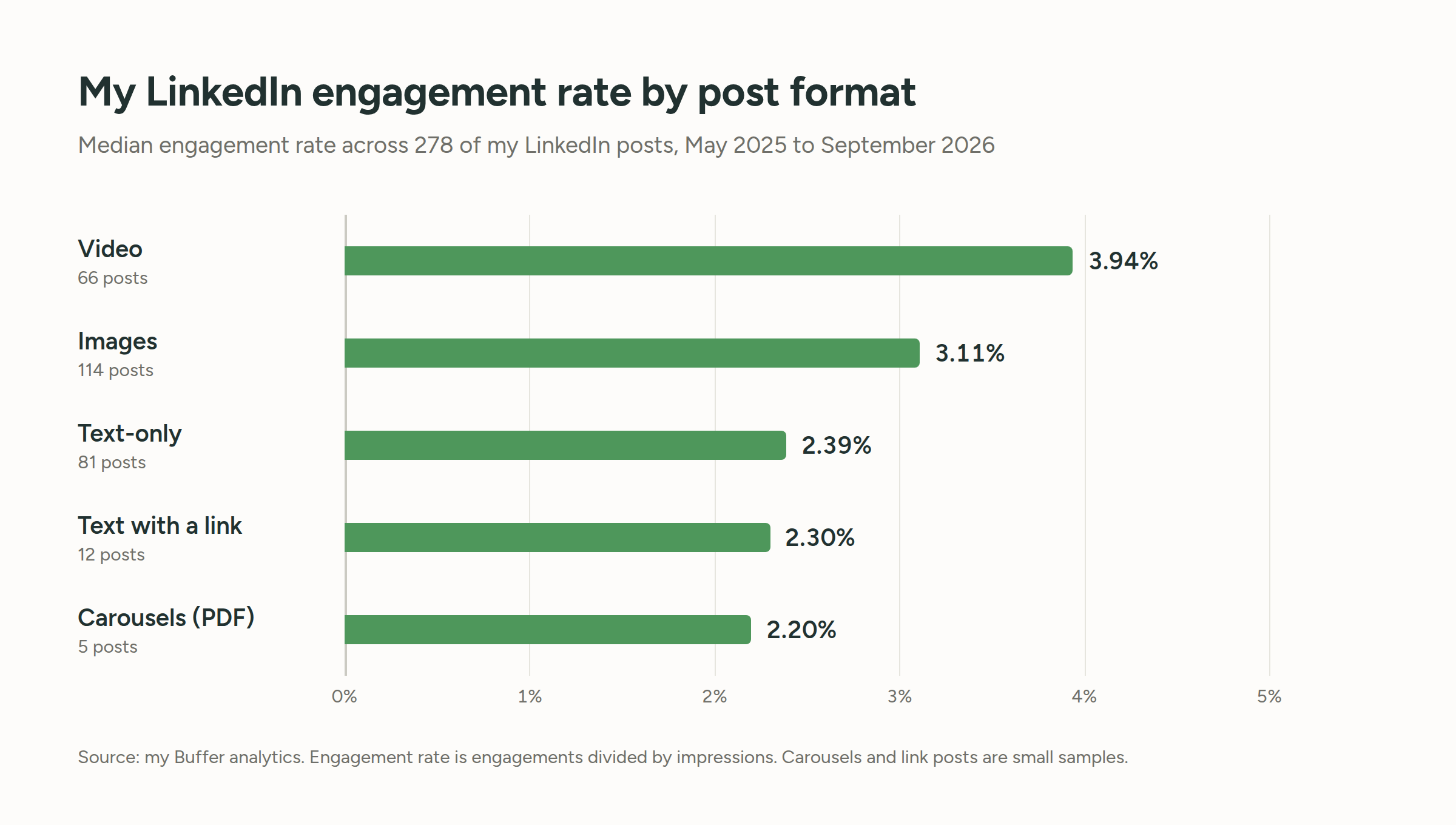
LinkedIn gives you a handful of formats to post, and they perform very differently. When I went through 52 million posts for our State of Social Media Engagement report, here's how the main ones compared on LinkedIn:
| Format | Median engagement rate |
| Carousels (document posts) | 21.77% |
| Video | 7.35% |
| Images | 6.52% |
| Link posts | 3.81% |
| Text-only | 3.18% |
Carousels are the standout, with a median engagement rate about three times video's and nearly seven times text-only posts'. A carousel on LinkedIn is a PDF you upload as a document post, which shows up as slides people swipe through. They work for anything with steps or a list: a process, a breakdown, a set of examples. (If you use Buffer, you can schedule PDF carousels to LinkedIn from the web app.)
Video sits at number two. My colleague Kirsti Lang, who dug into these numbers in our format study, put it well: "carousels for engagement and video for reach is a solid combination." Text-only posts come last on engagement, but they're the fastest to make, which is always a win in my book. And link posts are near the bottom for the reasons in the previous tip.
So it's worth knowing what you're getting from each format and trying a few. When I looked at my last three months, seven of my eight most-engaged posts were videos, and I hadn't posted a single carousel, which is a bit awkward given the table above (do as I say and such).
📚 If you're starting from a blank page, here are 11 LinkedIn carousel examples to work from.
11. Post consistently (and more often than you might think)
Posting more often doesn't hurt your reach on LinkedIn. When we looked at more than 2 million posts from over 94,000 LinkedIn accounts, posting two to five times a week got about 1,182 more impressions per post than posting once a week. Six to 10 posts a week got about 5,001 more, and 11 or more got nearly 17,000 more per post, plus about three times the engagements. That held whether an account had 500 followers or 50,000.
That doesn't mean you need to post every day. We recommend two posts a week while you're building the habit, and more once you know you can keep the quality up. I personally post around four times a week.
As for when to post, our analysis of 4.8 million posts found that weekdays between 3 p.m. and 8 p.m. (in your local time) did best, with Wednesday at 4 p.m. the strongest single slot. Mornings, the old default, did worse than they used to.
You also don't need to sit by your phone for a "golden hour" after you post. LinkedIn has never confirmed one, though replying to early comments can definitely help keep a post going.
🎥 We made videos on both: how often to post on LinkedIn and the best time to post on LinkedIn.
📚 Or read the full studies on how often to post and the best time to post on LinkedIn.
12. Check your LinkedIn analytics every week
Everything in this section so far is a starting point. Your analytics show you what your audience actually responds to, which beats any blog post's advice (this one included).
Once a week or so, look at:
- Which posts got the most reactions, comments, and reposts, and what topic and format each one was.
- Which posts got the most impressions, and what their hooks were.
- Which posts got the most saves and sends. LinkedIn added both in September 2025, and they're a good sign that a post was useful enough to keep or pass on.
- Who your posts reached. Since June 2026, LinkedIn has been rolling out a breakdown of how much of your reach came from inside your network versus outside it, which is the closest thing you'll get to "how many potential new followers saw this." It also shows the top job titles, industries, and locations of the people who saw each post, which is handy if you're trying to reach a certain kind of client.
- Which posts brought in new followers.
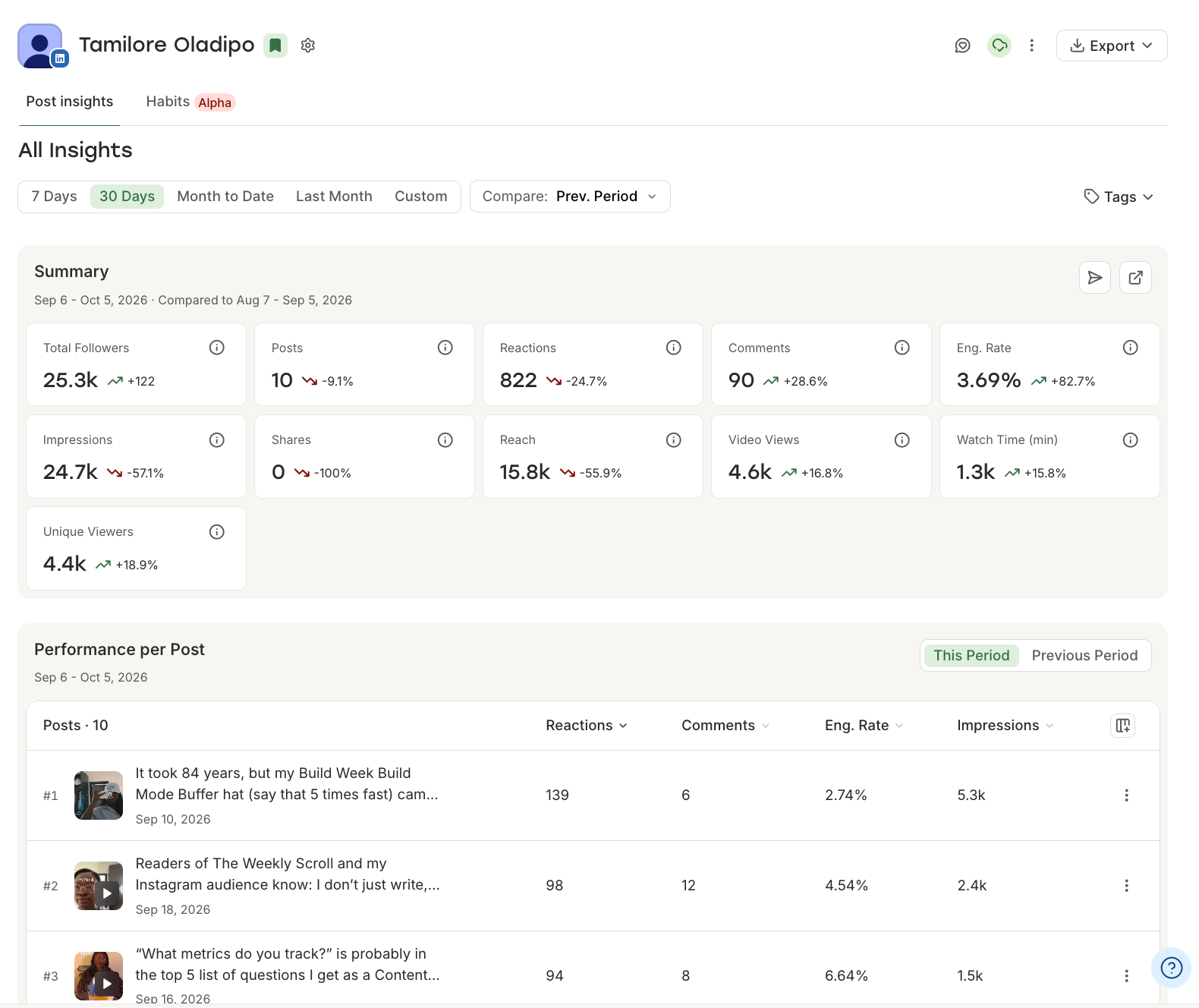
Then post, let the results tell you what your audience wants, and make more of that.
📊 If you use Buffer, its analytics show engagement and follower growth for LinkedIn profiles and Pages, and you can sort your posts by what did best. You can also connect your Buffer data to an AI tool like Claude or ChatGPT and ask it what's working.
Turn conversations into followers
Comments are one of the two things LinkedIn's algorithm is trying to predict (the other being whether someone stays on your post), so the conversations around your content matter almost as much as the content itself.
In my experience, this is also where a lot of growth actually happens: in your replies, in other people's comment sections, and in the people you team up with.
13. Reply to your comments
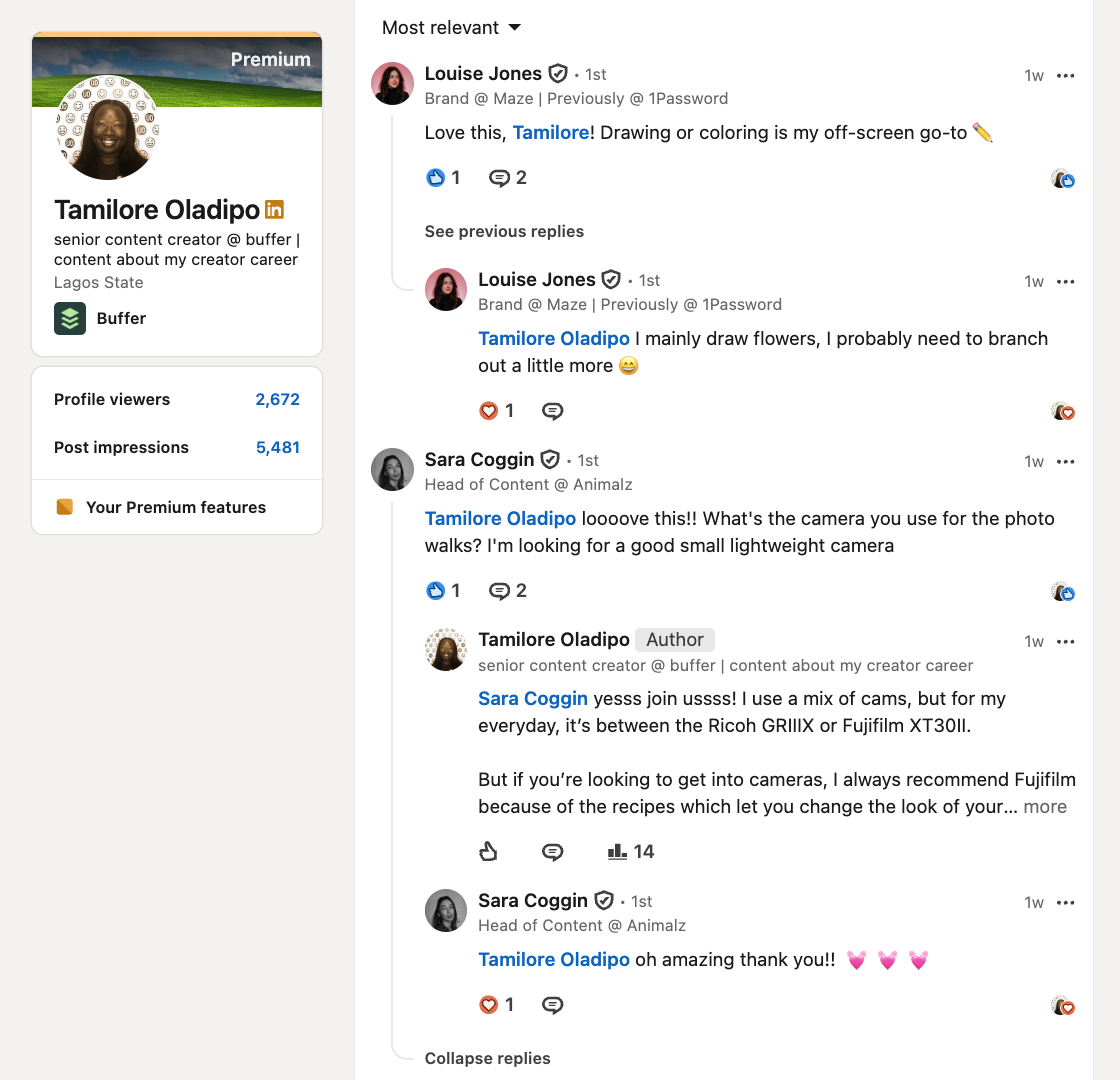
This is the tip with the clearest data behind it, so I'll start there. When we looked at nearly 2 million posts across six platforms, replying to comments lifted engagement on LinkedIn by about 30%. And about 83% of LinkedIn profiles did better when they replied, the highest share of any platform in the study. So it helps almost everyone who does it.
Every reply is another comment on the post, and comments are one of the things the feed is looking for. A post with a conversation under it also looks more alive than one with the same number of likes and no replies.
So set aside time to respond to every comment and DM that comes in on your posts. It's the single highest-leverage 20 minutes you can spend after publishing.
A few things that make the replies count for more:
- Reply with more than "Thanks!" Ask a question back, add a detail, or disagree if you do to keep the conversation going.
- Reply to the ones that clearly took effort first. If someone wrote three sentences, they've given you an opening to write three back.
- Don't automate it. In February 2026, LinkedIn started limiting automated comments, keeping them out of the default "Most relevant" view and restricting accounts that keep posting them. A scripted "Great post!" can now do more harm than no reply at all.
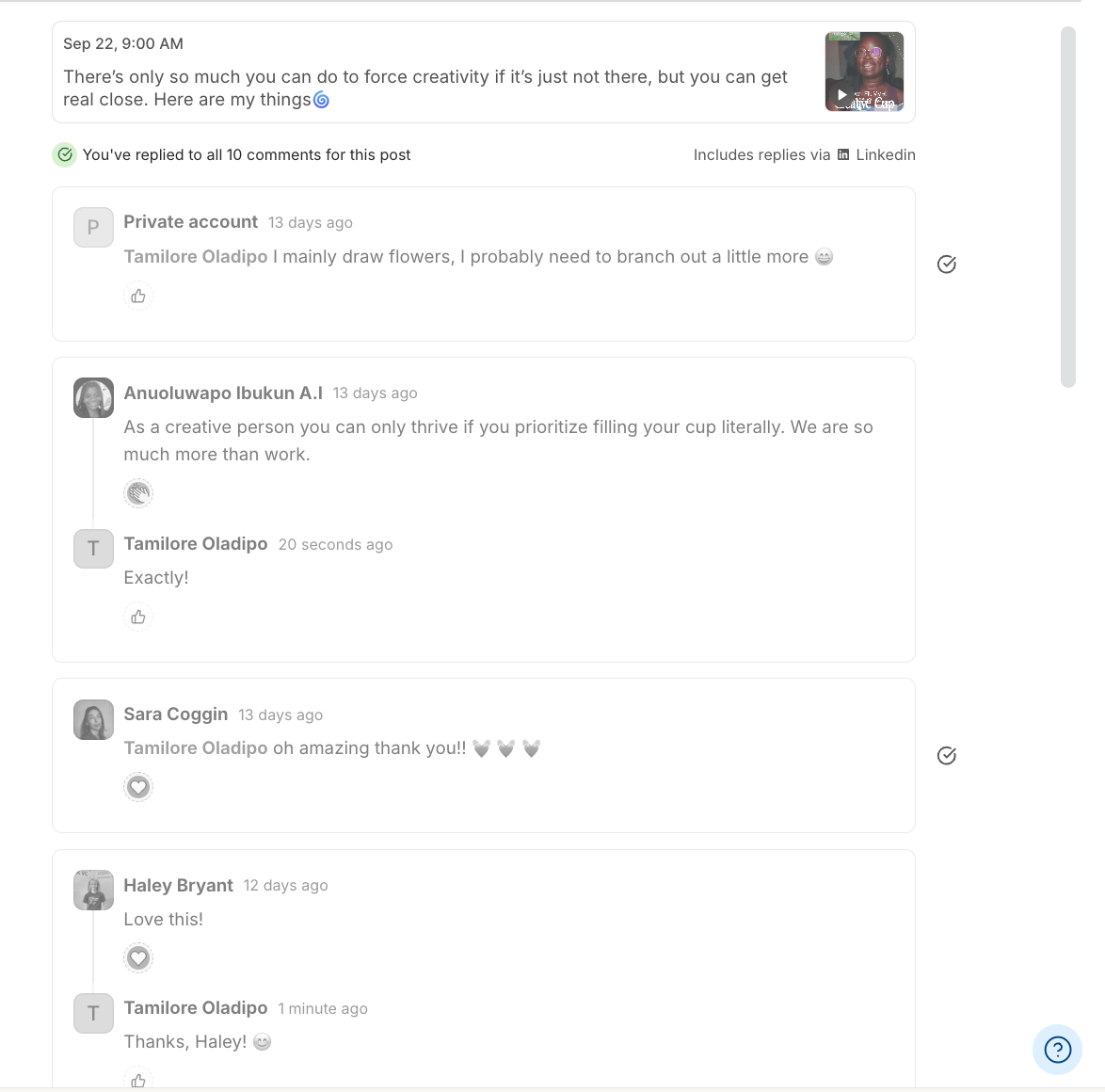
🗨️ Buffer's Community pulls your LinkedIn comments (and the ones from your other social media) into one place, so nothing slips through.
14. Comment where your future followers already are
Most of the people who'll follow you next haven't seen your profile yet. They're in the comments of accounts they already follow, and the easiest way to get in front of them is to be in those comments too.
This works in both directions. When you leave a comment on a bigger account's post, everyone reading that thread sees it, and a good one gets sorted toward the top under "Most relevant." At the same time, your own connections and followers may see that post in their feed with "[your name] commented on this" above it. So one thoughtful comment can put you in front of someone else's audience and remind your own that you exist, without you posting anything.
Start by finding the people whose audience overlaps with the one you want, whether that's other creators in your niche, leaders in your industry, or the kind of clients you'd love to work with. Then comment on their posts thoughtfully and often. The "thoughtfully" part matters more now, since LinkedIn's crackdown on automated comments means generic ones sink.
What tends to work:
- Add something: a related example, a number, a counterpoint. If your comment could be pasted under any post, it's not doing much.
- Ask a real question. It gives the author a reason to reply, which puts your name in the thread twice.
- Skip the pitch. Someone else's comment section isn't the place to mention your newsletter.
And when there's someone you'd like a real two-way relationship with, send them a connection request with a personal note. A message that's clearly written for them goes a long way.
15. Collaborate with other creators
Commenting gets you in front of someone else's audience for a moment. Collaborating gets you introduced to it.
Partnering with another creator on something (a post, a live, a newsletter swap, a series) puts your name in front of their followers with their endorsement attached, which is a very different thing from showing up in their comments. It's also, honestly, more fun than posting alone, and that tends to show in the content.
And in some very welcome news, LinkedIn now supports collaboration natively. In June 2026, LinkedIn added collaborative posts: you can invite another member or a company page to co-author a post, and everyone involved is listed at the top of it. The post shows up in both of your networks, and LinkedIn has been fairly open that member profiles carry more reach than pages, so this is also the cleanest way for a page to borrow some.
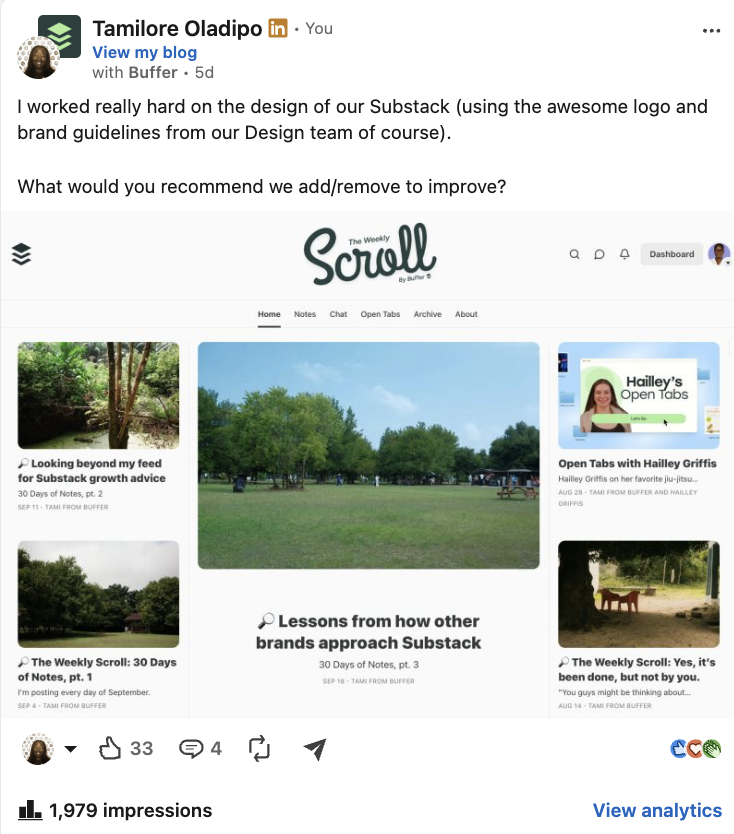
A few things that make a collaboration worth the effort:
- Pick people your audience would want to hear from, not people who do your job. Two content creators collaborating reach the same people twice. A content creator and, say, a founder who hires content creators reach two different rooms.
- Make it something neither of you would have posted alone. A conversation, a comparison, a "here's how we each do it." If either of you could have written it solo, the collaboration isn't adding anything.
- Keep the thread going afterward. Reply to each other's comments, tag each other when it's relevant, and do it again in a few months.
📚 Learn more about how collab posts work on LinkedIn.
16. Promote your LinkedIn profile everywhere else
Not everyone who'd follow you on LinkedIn is going to find you on LinkedIn. Some of them already follow you somewhere else, read your emails, or visit your website, and they just don't know you're posting here.
So put your LinkedIn URL in your email signature, link it from your website, and mention it on your other social channels. A few places that are easy to forget:
- Your bios on other platforms. If you're on Instagram, TikTok, or Substack, your link in bio is a natural place for LinkedIn, especially if LinkedIn is where you post most.
- Your newsletter footer, if you have one. Someone who reads you every week is exactly the kind of person who'd follow you.
- Anywhere you're introduced: podcast bios, speaker pages, guest post bylines. Give people your LinkedIn URL as well as your website.
- If you run a business, your website's About or team page, since that's where people go to see who's behind the company.
The crossover goes the other way too. One of my most-seen posts recently was about being surprised that someone had caught my TikTok video on their For You page and then found me on LinkedIn. Audiences overlap more than you'd think, and most of the time people just need to be told where else you are.
Use LinkedIn features to boost your growth
Everything up to this point runs through the feed: LinkedIn decides who sees your post, and you're working to make that decision go your way. Newsletters and LinkedIn Live are different, because they reach people through a notification or an email, which the feed doesn't control. Polls do go through the feed, but they're one of the easiest ways to get people interacting with you. So all three are worth a look, even if your regular posts are doing fine.
17. Start a LinkedIn newsletter
A LinkedIn newsletter is a series of articles people can subscribe to. When you publish a new edition, subscribers get a notification and, for many of them, an email, so it reaches people whether or not the feed shows it to them.
It's also easier to start one than it used to be. In August 2025, LinkedIn opened newsletter creation to every member, with no follower minimum (company pages still need more than 150 followers). At the time, LinkedIn said there were more than 184,000 newsletters on the platform, with 59% more people publishing them and 47% more engagement than the year before.
The follower-growth part works like this: when you publish your first edition, LinkedIn invites your connections and followers to subscribe. Everyone who does has opted in to hear from you regularly, which is a warmer relationship than a follow, and it doesn't depend on your next post landing.
Two caveats. First, not every subscriber gets the email. Goodman checked this in August 2026 and found only around 35% to 60% of subscribers received the email edition, so treat your subscriber count as an upper bound. Second, a newsletter is a commitment. If you can't see yourself publishing one at least every couple of weeks, a strong Featured section will probably do more for you than a newsletter that stops after four editions.
We have a couple of LinkedIn newsletters at Buffer:
- Buffer’s Bottom Line, a transparent look at our finances written by Kyle Allen on our Finance team, has 33.1K+ subscribers.
- Our Open blog newsletter where we cross-post already published articles with 13.7K+ subscribers
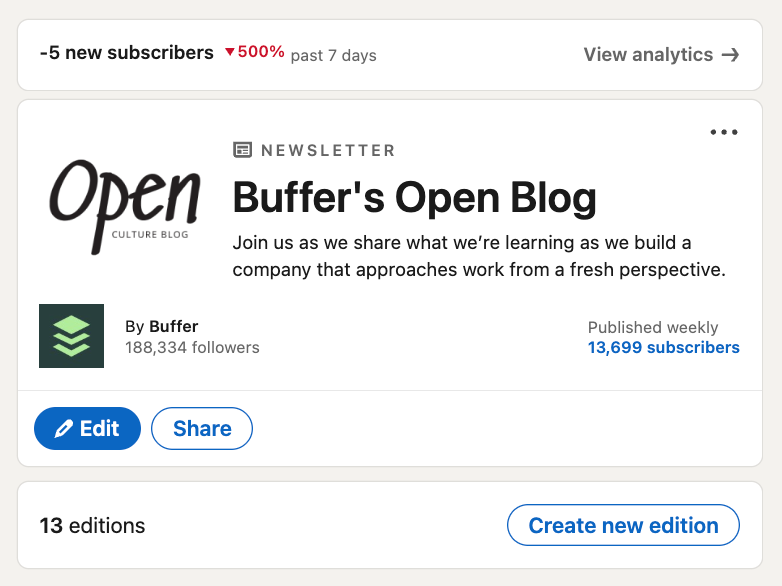
🌱 Here's how creator Jerrica Long grew her newsletter from 500 to more than 1,700 subscribers in 90 days while tripling her LinkedIn impressions with Buffer.
18. Host LinkedIn Live sessions and events
LinkedIn Live is the platform's livestreaming feature, and it's tied to events: you set up an event, people RSVP, and when you go live, they get a notification. That notification is what makes Live useful for growth. It reaches people who've already said they're interested, whether or not the feed would have shown them your post.
Since June 22, 2026, every LinkedIn Live has to be scheduled as an event first, so you can't just hit "go live" anymore. You can still go live on short notice by scheduling an event a few minutes ahead.
Creator Jayde I. Powell is a good example of this done well. She hosts a live series called "Creator Tea Talk" where she invites her audience to ask her anything, and because it's a recurring series with a name, people know when to show up.
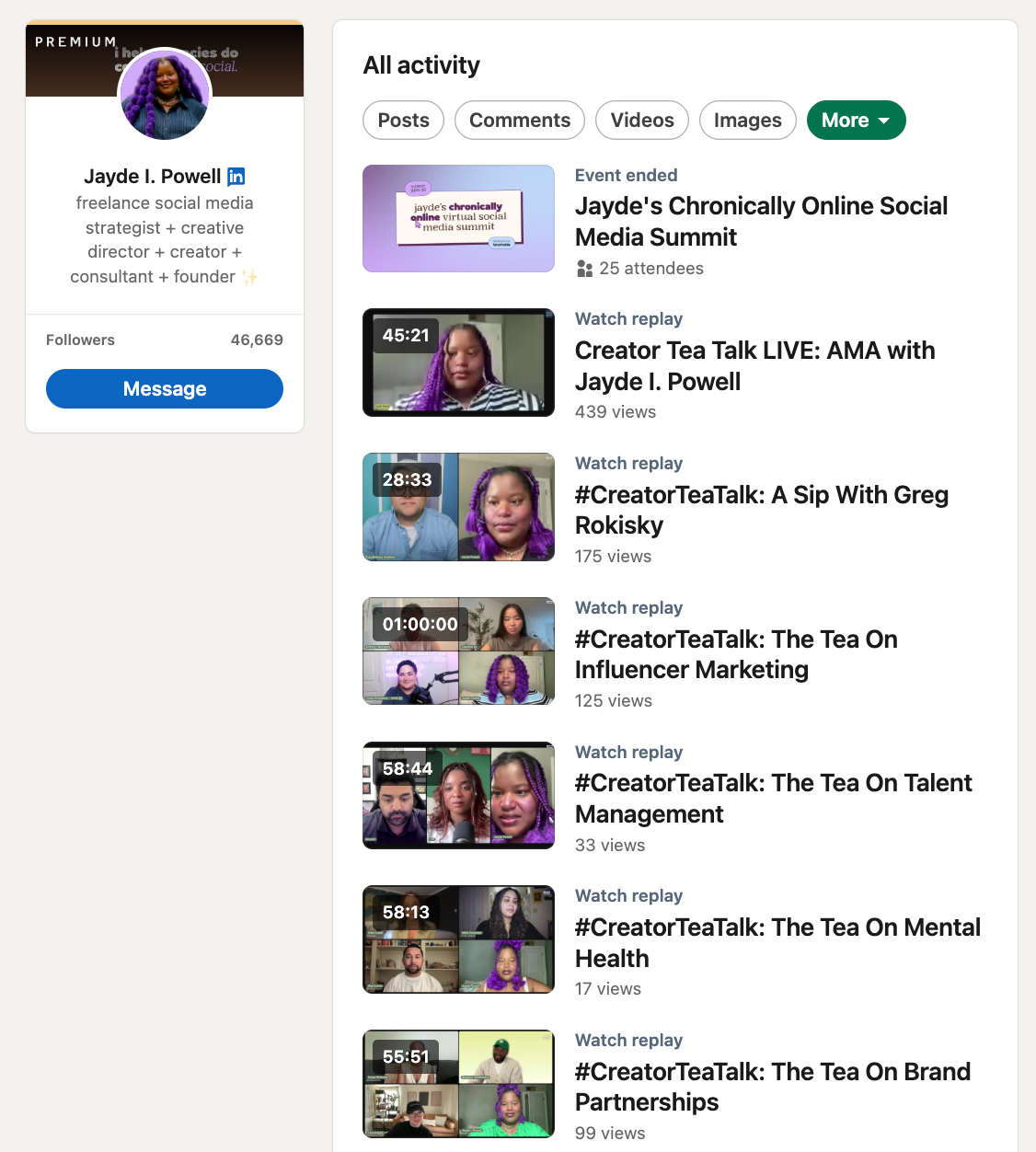
If you're going to try it:
- Give it a name and a rhythm. A monthly "ask me anything" is easier to remember than a one-off. If you run a business, that might be a monthly customer Q&A or a product walkthrough.
- Post about it a few days before, then on the day. The event page does some of this for you, but a reminder in the feed catches people who didn't RSVP.
- Have a plan for the first two minutes. Lives fill up slowly, and early arrivals will leave if you're waiting for the room to fill.
19. Use LinkedIn polls to start conversations
A LinkedIn poll is one of the quickest posts you can make: a question and up to four answers. They're also rare. In Metricool's 2026 study of 673,658 LinkedIn posts, polls made up less than 1% of what company pages posted, but got the highest average impressions of any format on those pages.
The tradeoff is engagement. In Socialinsider's analysis of 1.3 million posts from business pages, polls averaged a 4.2% engagement rate, below the 5.2% average for LinkedIn as a whole.
So polls work best as a conversation starter. Ask something your audience actually has an opinion on, add your own answer in the comments, and turn the results into a follow-up post. A poll asking which of three topics people want you to cover next also tells you what to make.
Most of the poll data out there comes from company pages, so if you're posting from a personal profile, try a couple and check your own numbers.
How to grow LinkedIn company page followers
If you're here for your personal profile, you can skip this section (or stay).
If you also look after a company page (or you're the person who got handed the login), read on, because growing a page can be quite the journey.
Start by making sure the page itself is complete: a clear tagline, an About section that says who the company is for, and a custom button that points somewhere useful. Most of the content advice above applies to a page too. The numbers are just harder. Company page organic reach fell by 60% to 66% between 2024 and early 2026, according to Ordinal's roundup of the data, and in Metricool's 2026 study, only 7% of company pages grew enough to move up a follower tier.
So growing a page now mostly means getting it in front of people without relying on the feed.
20. Use your invite credits on the right people
LinkedIn gives company pages a monthly allowance of invite credits, which admins can use to invite their own connections to follow the page. In March 2026, LinkedIn cut that allowance from 250 credits a month to 50, while Premium Company Pages still get a higher allowance.
With only 50 a month, it's worth being picky. Each invite uses one credit, and you get the credit back if the person accepts, so the more relevant your invites, the more you can send. Start with the people most likely to say yes: customers, collaborators, and anyone who's engaged with the page's posts or with your own posts about the company.
You'll find your balance in your page's admin view, under Invite to follow in the left menu.
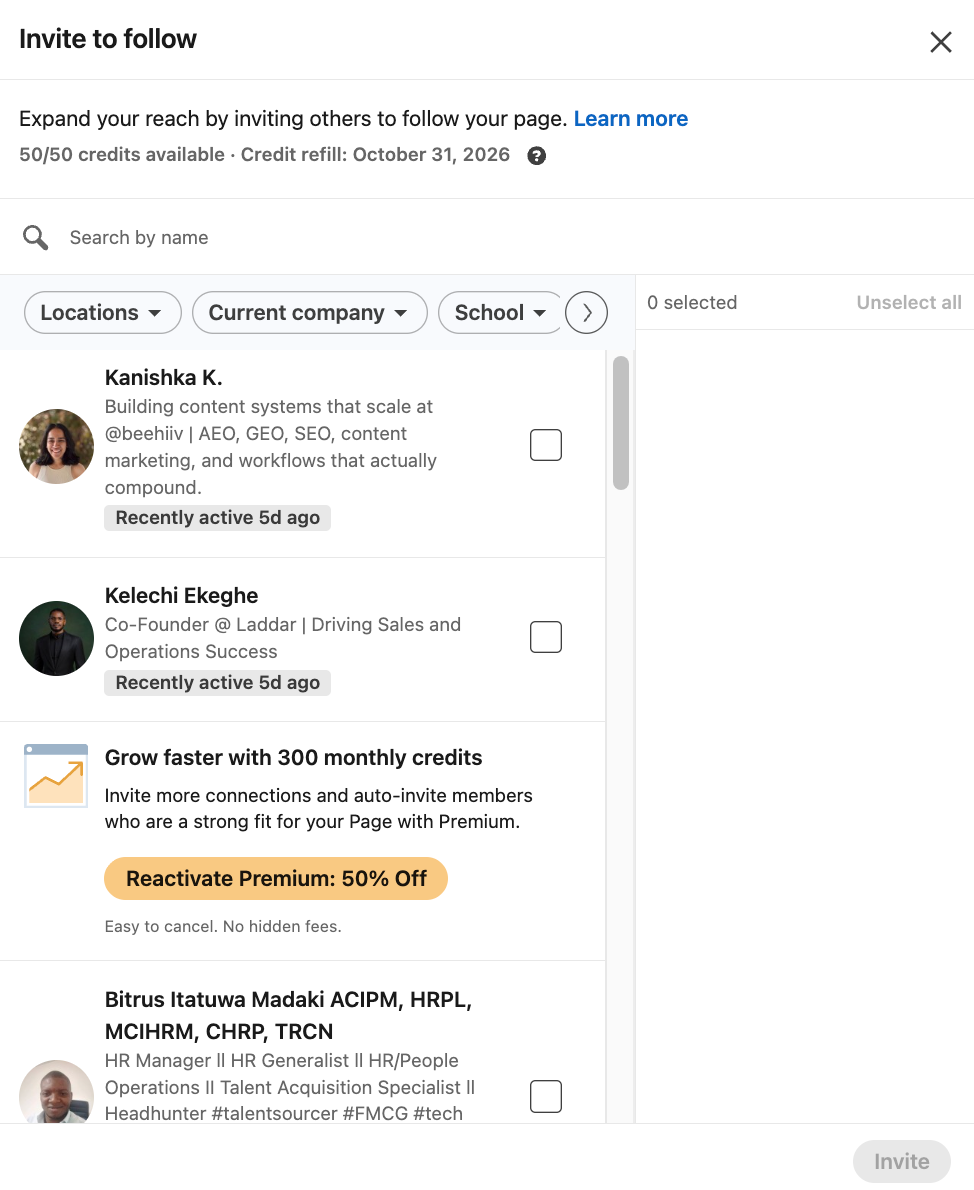
21. Put your team at the forefront of your page
Personal profiles get 63% higher engagement than company pages on average, according to Metricool's 2026 study. The same thing shows up in AI search: when my colleague Simon Heaton looked at how AI tools cite LinkedIn, he found they mostly cite posts written by people rather than company pages.
So the most effective thing a page can do is let the people behind it do most of the posting, and be the place people go to find more. In practice, that looks like:
- Team members posting about their work in their own voice, and tagging the page when it's relevant.
- The page reposting or quoting team posts, so it becomes a curated feed of the people behind it.
- Team members co-authoring collaborative posts with the page, so a post carries a person's reach and the page's name at the same time. (One catch: pages added as collaborators can't see the post's engagement metrics, only their usual Page analytics.)
- Everyone listing the company in their Experience section, so they show up on the page's People tab, and mentioning the page in their About or Featured sections.
This is how we do it at Buffer. In 2025, we launched Team of Creators, which made posting part of the job for everyone at Buffer, including people outside marketing. There's a Slack channel where people share drafts and cheer each other on, a resource hub, and regular workshops for anyone who's stuck, and Buffer's own LinkedIn and Instagram reshare what teammates post. Nearly all of our team of 78 takes part, and by August 2025 that had added up to more than 4,100 posts reaching about 2.5 million people.
And if your team is just you, you're the team. Post from your own profile, tag the page when it fits, and reshare your best posts from the page. Your personal profile will usually reach more people than the page can, so that's where most of your effort should go.
If you're trying to get a team posting, what matters most is who goes first. Olga Andrienko, VP of Brand Marketing at Semrush, whose team added half a million in extra reach for the company within two months of employee posting, put it plainly in Kirsti's piece on employee personal brands: "When senior management shows it's OK to share thoughts, and it's OK to invest time in your personal brand, people start posting too."
📚 Sabreen Haziq, who runs the program, wrote up how Team of Creators works at Buffer, including the Slack channel, the workshops, and what we track. If you want to try this at your company, start there.
Increase your LinkedIn followers, starting today
Starting from zero is more doable than it sounds. When creator Sweta Sharma deleted her 7,000-follower account and started over in January 2025, she had more than 4,500 followers and 416,000 impressions within five months.
If I were starting from zero today, I'd do three things in the first week and nothing else: switch my profile button to Follow, write down the three topics I can talk about for hours, and post once about something I'm figuring out right now. Then I'd do the last one again the next week. Most of what's in this article is what happens after that, and none of it works if the posting stops.
That's the part people give up on, and I get it. I've been posting for six years, and there are still weeks where it's the last thing I want to do. What's kept me going is mostly boring: a schedule I don't have to think about, and a streak I don't want to break. Buffer's streak tracker is the feature I keep coming back to. Watching a number climb may seem a bit silly, but it works for me, and the scheduling means the posts go out whether I'm feeling it or not. It works for my colleague Sabreen Haziq too, who passed 356 days of posting in a row last year.
If you want a hand with the showing-up part, get started with Buffer for free.
More LinkedIn resources
- How Often Should You Post on LinkedIn? Data From 2 Million+ Posts
- The Best Time to Post on LinkedIn: 4.8 Million Posts Analyzed
- Replying to Your Comments on LinkedIn Boosts Engagement by 30%
- How to Schedule LinkedIn Posts (2 Easy Methods + Tips)
FAQ on how to increase LinkedIn followers
How can I increase my LinkedIn followers organically?
Start with your profile: switch your primary button from Connect to Follow, and write a headline that says who you help. Then post consistently about three to five topics, reply to every comment (about 83% of LinkedIn profiles in Buffer's data performed better when they did), and keep the full story in the post rather than linking out. Everything in this guide is organic, with no paid ads and no follower-buying.
How long does it take to grow LinkedIn followers?
Longer than most people expect, and it isn't linear. It took me about six years of consistent posting to reach 25,000 followers, and the first thousand was by far the hardest. Growth tends to pick up once you have a back catalog of posts on a clear set of topics and the feed knows who to show you to.
How many LinkedIn followers is a good number?
There's no benchmark that applies to everyone, and follower count matters less than it used to. Melanie Goodman's 2026 analysis found that an account with 8,000 focused followers can reach more people than one with 80,000 scattered ones, because the feed knows exactly who to show the smaller account to. A few thousand followers who care about your topics are enough to start getting inbound opportunities.
What's the difference between LinkedIn followers and connections?
Connections are mutual, need a yes from both sides, and are capped at 30,000. Followers are one-way, have no cap, and anyone can follow you without approval. Everyone who connects with you follows you automatically. Switching your profile's primary button to Follow (Settings & Privacy → Visibility → Followers → "Make follow primary") doesn't cost you connections — people can still connect with you via the More menu.
Is LinkedIn Creator Mode still a thing?
No. LinkedIn retired the Creator Mode toggle in early 2024. The features it bundled, like the Follow button, newsletters, and creator analytics, all still exist, they're just available to everyone without turning anything on.
Can I get LinkedIn followers without sending connection requests?
Yes, and it's the default for most creators now. Set Follow as your primary button so visitors can follow in one tap, comment thoughtfully on posts from bigger accounts in your niche so their audience sees you, and start a newsletter so people can subscribe. None of those need a connection request.
Do LinkedIn followers still affect reach?
Less than they did. LinkedIn rebuilt its feed in March 2026 to predict two things about each post: whether someone will stay on it and whether they'll react to it. Follower count isn't one of those signals directly, which is why a focused following now outperforms a large scattered one.
What's the LinkedIn algorithm looking for in 2026?
LinkedIn's engineers published a paper on the rebuilt feed in 2026, and it names two things the system tries to predict: whether someone will stay on your post past a certain point ("long dwell") and whether they'll like, comment on, or share it. It also reads what a post is about and matches it to people interested in that topic, which is why consistency on a few topics helps. LinkedIn has never confirmed a "golden hour" or any fixed time window after posting.
How often should I post on LinkedIn to gain followers?
Buffer's analysis of over 2 million LinkedIn posts found no penalty for posting more often. Two to five posts a week is a realistic sweet spot for most people, and accounts posting 11 or more times a week averaged nearly 17,000 more impressions per post. LinkedIn's own guidance is two to five posts a week. Consistency matters more than the exact number.
What type of content gets the most followers on LinkedIn?
In Buffer's analysis of 52 million posts, carousels (PDF document posts) had a median engagement rate of 21.77% on LinkedIn, roughly three times video and nearly seven times text-only posts. Beyond format, posts that share what you're learning, in your own voice, with a first line that makes people click "…see more," tend to bring in followers rather than just likes.
Why am I not getting followers on LinkedIn?
The usual causes, in the order I'd check them: your profile button says Connect instead of Follow, you're posting about too many different things for the feed to know who to show you to, your first lines aren't earning the "…see more" click, you're linking out in most posts, or you're not replying to the comments you do get. Fixing the first one takes 30 seconds.
Why did my LinkedIn followers drop?
Small drops are normal. LinkedIn removes fake and inactive accounts periodically, and people unfollow. A bigger drop usually follows a change in what you post about, since followers who came for one topic leave when it disappears. Check your analytics for the week the drop started and look at what you posted.
Do LinkedIn newsletters help grow your followers?
Yes. When you publish your first edition, LinkedIn prompts your connections and followers to subscribe, and each edition after that reaches subscribers by notification and email rather than depending on the feed. LinkedIn reported over 184,000 newsletters on the platform as of August 2025 and opened creation to all members that month. One caveat: not every subscriber receives the email, so treat the subscriber count as an upper bound.
Is buying LinkedIn followers safe?
No. It's against LinkedIn's policies, and it hurts you even if you don't get caught. Bought followers don't engage, which lowers your engagement rate, and the feed reads low engagement as a signal your posts aren't worth showing. You end up with a bigger number and less reach.
How do I grow a LinkedIn company page?
Mostly through the people who work there. Personal profiles get about 63% more engagement than company pages posting similar content (Metricool, 2026), so have team members post in their own voice and let the page repost and collaborate with them. Pages can also invite connections to follow, though LinkedIn cut the monthly limit from 250 to 50 in March 2026.
Is LinkedIn still worth it for growing a following in 2026?
Yes. LinkedIn has over 1.3 billion members and, in Buffer's analysis of 52 million posts, the highest median engagement rate of any platform we looked at, at around 6.2%. You don't need millions of followers or a big job title. Showing up consistently, sharing what you're learning, and building real connections still works, and it works better with a smaller focused audience than most people assume.
Try Buffer for free
200,000+ creators, small businesses, and marketers use Buffer to grow their audiences every month.